<< click
on picture to enlarge >>
these pictures illustrate
LEC Translate (German Language Package)
|
|
|
|
| Accurate Translation | Custom Dictionary | Flexible Options |
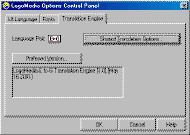
Control Center is designed for launching and configuring LEC specialized applications for translation of text, files, email, chat, blogs, instant messages, or web pages. The control center also includes its own text box for text translation.
ClipTrans
ClipTrans translates any text which is selected and copied. Paired with a new function which automatically identifies the source language, users with multilingual packages can easily and quickly translate email, text, instant messages and web pages.
LogoTrans
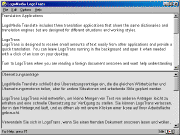
LogoTrans is designed to receive small amounts of text easily from other applications and provide a quick translation. You can leave LogoTrans running in the background and open it when needed with a click of an icon on your desktop. Turn to LogoTrans when you are reading a foreign document onscreen and want help understanding a sentence or paragraph.
FileTrans (LEC Translate Pro only)
FileTrans is a large-volume translation tool. It translates whatever you give it—one document or an entire directory of documents—in the background, leaving you and your computer free for other tasks. Use FileTrans whenever you have a large number of files to translate, or want to translate in the background, including HTML files (Web pages). Drag a file or directory icon onto the FileTrans window and the translation is automatic. It's compatible with these file formats: Adobe PDF, MS Word DOC (including Word 2007), HTML (web pages), XML, RTF (Rich Text Format), and TXT (‘text only’) files.
TransIt
TransIt is an application for quick translating a word, phrase, or sentence. Translate a sentence or two and then pop the translation into another application. Use it for chat or to instantly translate arriving messages.
MS Office Plug-ins
The LEC Translate user interfaces team up with your familiar text programs, such as Microsoft Word, PowerPoint, Excel, Outlook, and Internet Explorer. Use them alone or in combination with other LEC Translate translation tools. Save the translated versions as Word, Excel, PowerPoint files, or HTML (web page) files.
MirrorTrans
MirrorTrans is an "at large" window on your desktop where translation appears. You simply assign Translation Mirror to any other window on your desktop and everything in that window is translated ... in real time. Use it to translate web pages, email or documents.
Translate Toolbar for Microsoft Internet Explorer and Firefox
Translate toolbar for Microsoft Internet Explorer allows you to translate web pages from IE and Firefox with a single mouse click.
Web Page Translation
All you have to do is assign the MirrorTrans window to your current Web browser window and watch Web pages get translated in it. Or, save the Web page (or even the entire Web site) and apply FileTrans to it. Or, use Translate toolbar for Microsoft Internet Explorer
Dictionary (LEC Translate Pro only.)
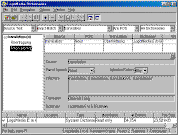
Dictionary is an application for viewing the contents of LEC Translate’s system and add-on dictionaries, as well as creating and editing user/custom dictionaries. The Dictionary utility is a powerful tool which you can use to get just the right translation. Use the Dictionary Browser application to view the contents of LEC Translate’s dictionaries and look up specific words and phrases. For language pairs that support user dictionaries, Dictionaries also lets you create user dictionaries and edit their contents.
System and Add-on Subject Dictionaries
A LEC Translate dictionary (also called a system dictionary) is installed for each translation engine, or language direction, and opens whenever your translation application uses that engine. The LEC Translate dictionary contains translations for many idiomatic expressions as well as individual words. In order to correctly interpret and translate nuances of meaning, system dictionaries classify words according to complex rules. You can browse a LEC Translate system dictionary and look up words, but you cannot modify it.
Most translation engines, or language directions, let you supplement the system dictionary with add-on subject dictionaries which contain terms used in specialized fields such as computers, business, medicine, law, etc., and will significantly increase your translation quality. Each add-on dictionary contains from 1,000 to 80,000 terms for a total of more than 5,200,000 specialized terms in all dictionaries.
Custom Dictionaries (LEC Translate Pro only.)
Most translation engines also let you employ user dictionaries, which you create and modify yourself. A user dictionary lets you:
Untranslated Word List/Lookup.
LogoTrans displays a window listing all words which have no translation in any loaded dictionaries and saves the list to a file. This helps to create dictionaries and improve translation accuracy. The Dictionary program analyzes text files and produces a list of all words that are not in any loaded dictionary, making it easier to add new entries to a user dictionary.
Translate DotNet
Translate DotNet is your gateway to the LEC Translate translation services available online. You can obtain fast, accurate translations without having to install translation applications or dictionaries on your hard drive, and you will always have access to the most current developments. Translate DotNet provides translations between English, Arabic, Chinese, Dutch, French, German, Hebrew, Italian, Japanese, Korean, Persian, Polish, Portuguese, Russian, Spanish, Turkish, and Ukrainian, and now also allows translation from Indonesian, Pashto or Tagalog to English. Using LEC composite engine, you also get two-step translations using English as an intermediate form when we do not have a direct translation engine (for example, Spanish <> Japanese).
Upgrade Note
You can order any LM Translate package and add-on other languages or technical dictionaries later on. For more information and/or to place a LEC Translate upgrade order, please call 1-416-763-4256.